TLDR: Choose restaurant operations software by the job you need done: orders, labor, inventory, daily tasks, or follow-up across locations. Ask each vendor to show that job using your reports, including who acts and how you check the result. Start with the gap in your current tools before adding another system.
What is restaurant operations software?
Restaurant operations software is a broad label for tools that help run the business. It can cover sales, staff schedules, inventory, accounting, or daily tasks. Those jobs overlap, so start with a concrete problem: missed counts, labor overruns, unfinished tasks, or reports nobody has time to review.
For a multi-unit group, write down which location needs attention, who should act, and what evidence would show the problem is resolved. Use that as your demo brief.
Compare tools by the job you need done
These examples show vendor-advertised scope, checked October 31, 2026. This is a starting shortlist by job, not a tested ranking. Confirm the exact plan, access, and workflow with each provider.
| Job to evaluate | Example and documented scope | What to ask in the demo |
|---|---|---|
| Orders and payments | Toast lists point of sale, payment processing, and online ordering. | Show an order, payment, refund, and the report your manager uses at close. |
| Scheduling and labor planning | 7shifts supports schedule building and labor budgets. | Show how a manager spots a schedule that exceeds the agreed labor budget. |
| Accounting, inventory, and workforce | Restaurant365 offers these functions across its platform. | Show how an invoice or inventory issue reaches the person responsible for resolving it. |
| Daily tasks and audits | Crunchtime Operations Execution covers operational tasks and audits. | Show a missed task, the escalation, and the evidence required to close it. |
| Reviewing issues and following up | Marty describes report review, alerts, and a service with human follow-up. | Show which reports are supported, who owns the next step, and how the result is checked. |
Ask your current vendors to demonstrate the missing workflow too. Do not assume you need a new product because a feature was absent from the first demo.
What should multi-location teams check?
Can you trace an issue to its source?
Ask to see the report, location, date range, and calculation behind an alert. Check how the tool handles missing or late data. A result should be easy for your manager to verify before acting.
Does the next step have an owner?
Ask who receives the issue and who is responsible for acting. Find out what happens when that person is away, disagrees with the finding, or leaves the task unfinished. Keep the difference between software reminders and a staffed follow-up service clear.
Can you check the result?
Ask the vendor to separate an issue found, an action taken, and a result verified. Decide which comparison you will use before the trial starts. A manager's "done" message confirms a response; you still need to check what changed.
Will it work with your actual setup?
List the systems used at each location. Ask the vendor to confirm the needed reports, access method, update timing, and limits in writing. A logo on an integrations page is a reason to ask about coverage, not confirmation that your exact setup is supported.
A sample demo: follow a labor issue to its result
This is an illustrative evaluation exercise, not a customer result.
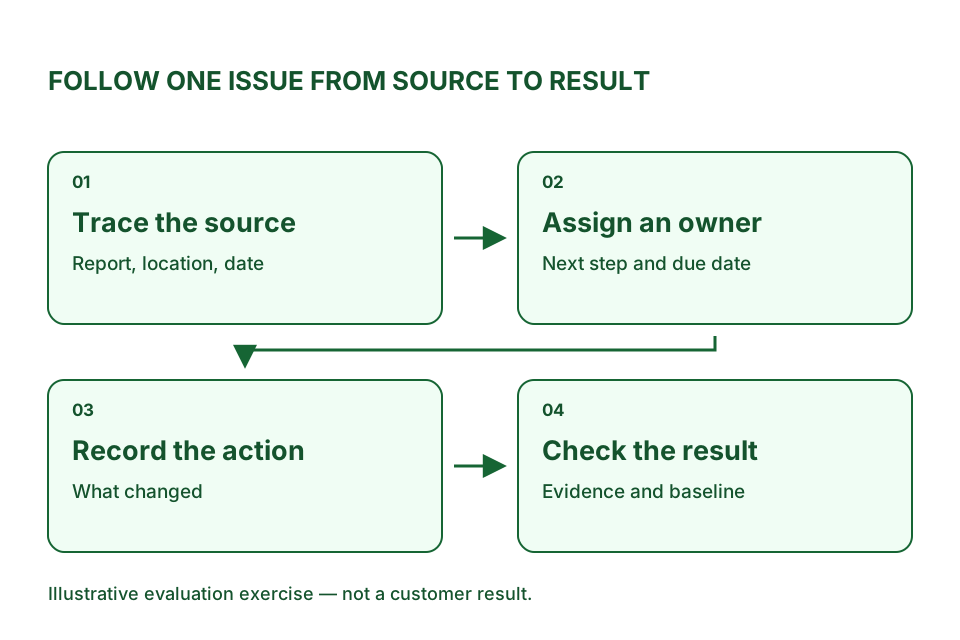
At Location A, labor is above the target agreed with the operator. Ask the vendor to walk through the following:
- Show the sales and timecard records used, with their dates and definitions.
- Explain whether the change comes from sales, hours, pay rates, or missing data.
- Give the manager a specific next step that protects service and respects operating constraints.
- Record what the manager actually did and who will follow up.
- Compare the next relevant period with the agreed baseline. Account for changes in sales, opening hours, and staffing before claiming an improvement.
Keep the final status precise: issue confirmed, action completed, result verified, or still unresolved. Use the same exercise for every vendor you evaluate. See our guide to restaurant labor cost control for the operating context.
What should you include in the cost comparison?
Request a written quote for your locations and required workflow. Ask about the base subscription, modules, setup, data connections, training, support, and any staffed service. Confirm the contract term and how fees change when you add locations.
Then list the work your team must still do: export reports, review alerts, contact managers, and check outcomes. Compare the complete job and its cost. Do not assume the lowest subscription covers the work you need.
Where does Marty fit?
Marty is for multi-unit restaurant groups that want help reviewing their numbers and following up on issues. Its current service options distinguish a morning report, alerts, and the Marty Operating Team, which includes human review and follow-up. See the current options.
Marty uses approved reports and access. It is read-only and does not automatically change schedules, prices, promotions, or other operating systems. Coverage depends on the systems and reports available. Read the current access boundary.
If your main need is taking orders or building staff schedules, start by evaluating the tools for those jobs. If the gap is reviewing issues across locations and getting the right person to follow through, discuss that workflow with Marty. These jobs may require more than one tool.
Questions to settle before you buy
Do we need to replace our POS?
Start by testing whether the existing POS supports the job you need. For Marty, the current offer works alongside existing systems; it does not replace your POS. Confirm report access before committing.
Does an alert mean money was saved?
Treat an alert as a finding to check. Confirm the issue, record the action, and verify the resulting change before calling it savings. Agree on the evidence required during the trial.
How should we run a trial?
Choose a location, a recurring problem, and a named owner. Agree on the source reports, success criteria, and review date. At the review, decide whether the workflow resolved the problem and whether your team can sustain it.
Bring one problem you keep chasing
Bring your locations, systems, and a recurring problem to a free working session. Discuss whether Marty fits before sharing system access. For related evaluation questions, see multi-unit restaurant analytics and manager follow-through.